

 >
Galaxy S26 Video Format
>
Galaxy S26 Video Format
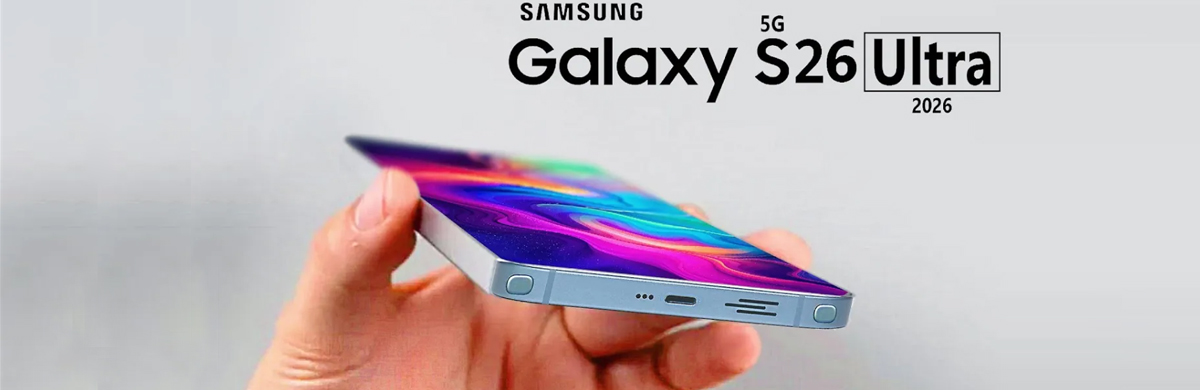
Q: I just bought a Galaxy S26, but I have several MKV video files that won’t play. When I tap them, it says ‘Can’t play this video’ or nothing happens at all. I need to resolve this as soon as possible because these videos are important to me. Also, I’d like to know exactly what video formats are supported by Galaxy S26.
A: According to the official specifications for the Samsung Galaxy S26 series, the MKV format is included in the list of supported formats. Therefore, the issue you're encountering is typically not due to format incompatibility, but may be caused by one of the following reasons:
The video codec is not supported
MKV is just a “container” format; the video and audio tracks inside it can use different codecs (such as H.265/HEVC, AV1, etc.). If the video uses a higher-spec or newer codec, the phone may not be able to decode it.The file itself is corrupted or incomplete
If the video file becomes damaged during transfer or storage, it may also fail to play.If you encounter issues playing videos on the Galaxy S26, it is recommended to download VLC for Android or MX Player from the Google Play Store. These players come with more comprehensive built-in codecs and can play most MKV files. Of course, this solution is not the best, as these players cannot play Blu-ray or DVD movies. For playing all the media files on Galaxy S26 series phones, you'd better convert these files to Galaxy S26 supported formats.
The Samsung Galaxy S26 range is rumored to have very impressive cameras, and while the Galaxy S26 Ultra is sure to have the best selection overall, the standard Samsung Galaxy S26 and Samsung Galaxy S26+ might actually have better telephoto lenses. The three Galaxy S26 phones have taken their turn running Geekbench V6. The models headed to the South Korean and US markets are specifically powered by a Qualcomm SM8850-1-AD Snapdragon 8 Elite Gen 5 rather than a home-grown Samsung chipset. You can record 8K, 4K and Full HD footage easily. So, you can share more delicate picture quality with your relatives and friends. Some technical parameters of these three mobile phones are the same. They support the same audio and video formats. What video and audio formats are supported by Galaxy S26 and Galaxy S26+/S26 Ultra?
Video: MP4, M4V, WMV, 3GP, 3G2, ASF, AVI, MKV, WEBM, FLV
Audio: AAC, MP3, M4A, 3GA, OGG, OGA, WAV, AMR, AWB, WMA, FLAC, MID, MIDI, XMF, MXMF, IMY, RTX, OTA, APE, RTTTL, DSF, DFF
Galaxy S26 comes with a 6.3-inch screen and supports playing videos up to 4K. These features make it a perfect portable media player to watch your favorite movies. As Samsung Galaxy S26 series has been very hot recently, many people may be wondering whether they can watch their favorite movies on Galaxy S26, Galaxy S26+ or Galaxy S26 Ultra. Though Galaxy S26 series doesn't support all the media types playback, you can still copy Blu-ray, DVD and other unsupported formats to your new smartphone. Since Acrok Video Converter Ultimate can help you achieve that, you can convert Blu-ray, DVD, MKV, AVI, MP4, MOV to Galaxy S26 series successfully so that you can play any movies on Galaxy S26/S26+/S26 Ultra anywhere anytime.
Free download Galaxy S26 Format Converter
 100% Safe & Clean 100% Safe & Clean
Run Galaxy S26 Format Converter and click "Load disc" to browse your computer's hard drive and choose the Blu-ray or DVD movie you want to convert for Samsung Galaxy S26. You can then review them in the preview window on the right and take snapshots freely. For converting downloaded common formats, please click the "Add file" icon to load your movies.
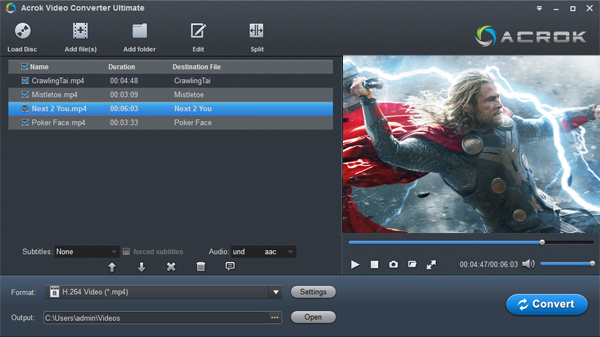
Tips: You can click the "Edit" icon to edit your movies, such as cutting black bars, removing unnecessary parts, adding watermarks, adjusting video effects, etc.
Since H.264 videos are supported by Galaxy S26, Galaxy S26+ and Galaxy S26 Ultra, here you can click "Format" and choose "Android > Samsung Galaxy S Series Video (*.mp4)" or "Common Video > H.264 Video (*.mp4)" as the output format.
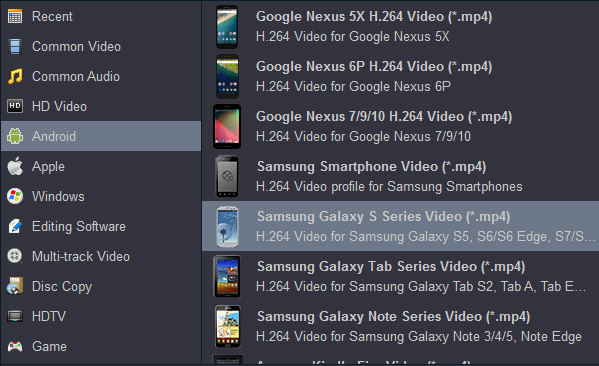
When all these have been prepared, press the "Convert" button to convert your Blu-ray, DVD and other video formats to H.264 MP4 for Galaxy S26/S26+/S26 Ultra. Once the conversion is finished, locate your converted videos by clicking the "Open" and transfer them to your smartphone to enjoy them wherever you go.


You just need to insert your Blu-ray disc into your computer's disc drive and just go out for a walk. It will do the Blu-ray to Galaxy S26 format conversion. No need to worry about anything. The option to select subtitle and audio track is useful.
Adam Stewart
Copyright © 2026 Acrok Studio All Rights Reserved. Terms and Conditions | Privacy | Refund Policy